
Package clause terms in visualized product
- 50/100/50
- 50/200/50
- Statutory
- 50/100/50
- 1000/1000
- 100K CSL

Mind map
The following mind map shows a coverage with Money, Number, and
Decimal package coverage terms.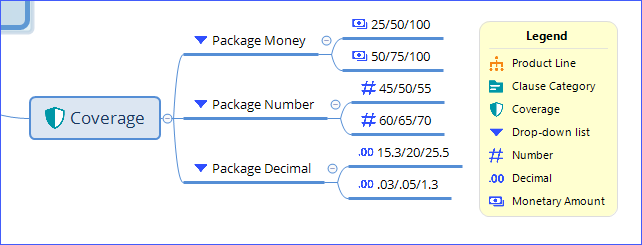
See also
Visualized product
When you import or update the mind map into PolicyCenter, these drop-down lists are imported as package clause terms. In the Drop-Down Definition popup, the Drop-Down Type is Package. If the marker type is Money in the mind map, the clause terms default to Money type. If the marker type is Number or Decimal, the clause terms default to Other.
If you select Default Additional Fields when you import or update the mind map, the values are extracted. For example, the values 25, 50, and 100 are extracted from 25/50/100. If the marker type is Money in the mind map, Currency is set to the default currency.
In the Drop-Down Definition popup, the Drop-Down Type is Package. If the list item marker type is Money in the mind map, the clause term Value defaults to Money type in the visualized product. If the marker type is Number or Decimal, the clause term Value defaults to Other. You can change the Value to a more appropriate type such as Count, Days, Hours, Money, or Percent.
Changing Text markers to package clause terms
For package clause terms with text labels, Guidewire recommends that you use the marker appropriate for the value, such as Number, Decimal, or Monetary Amount.If the marker type is Text in the mind map, the Drop-Down Type defaults to Package in the visualized product. Set the Value to the appropriate type and enter values. The label Value# is editable. Change Value# to an appropriate short name for the clause term.