
Designing the wizard for your multi-line product
After you define the new product, you must design its user interface wizard. The wizard can reuse many of the policy line screens from the base configuration.
You can examine the PCF files for each product by navigating in Studio to . Within the line node is a node for each product. The nodes are named with the abbreviation of the product. Each line node contains three folders. For a multi-line product, these folders contain the following:
- job
– Contains a PCF file that has the
LineWizardStepSetfor the multi-line product. In a multi-line product, the wizard steps typically include the following:- Line selector – A job wizard step that enables you to select the policy lines to include in a policy.
- Multi-line locations – A job wizard step that enables you to define locations that apply at the package level.
- One or more lines – One of more wizard step group widgets for each line in the product.
- Modifiers – A job wizard step for modifiers that apply at the package level.
You can add any other steps that your multi-line product needs.
- policy
– Contains PCF files for the line of business. The PCF files can be
used in both jobs and the policy file. In a multi-line product, this
node contains:
- Policy review screens – Enable you to review all policy lines in the package.
- Rating screens – Display rating information for all policy lines in the package.
- policyfile – Contains
PCF files for viewing the policy file.
- Menu item set – The main PCF file,
similar to the wizard for jobs. For example, the menu item set for commercial
property is
PolicyMenuItemSet.CommercialProperty. In a multi-line product, the menu item widgets in a menu item set point to location group links pages. - Location group links and pages – Each link points to a page that displays screens for the individual line of business. These pages display PCF files from the policy folder.
- Menu item set – The main PCF file,
similar to the wizard for jobs. For example, the menu item set for commercial
property is
The menu item sets for single and multi-line product differ. In a multi-line product, each menu item points to a location group links file, as shown in the following illustration.
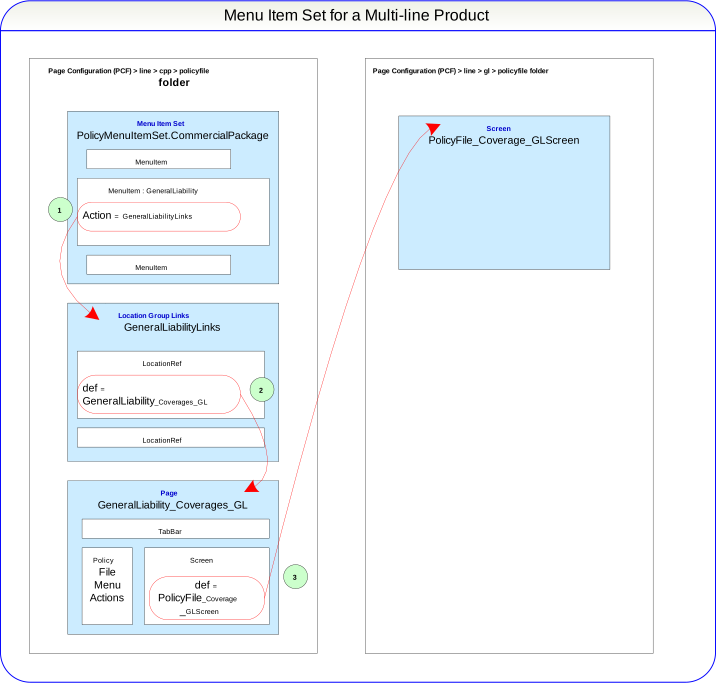
- In the menu item set, a menu item points to a location group links file. The links file contains
a series of
LocationRefwidgets. - A
LocationRefpoints to a page in the policy file. - The page points to a screen in the line policyfile folder.
See also